
Upload photos, and you have a store with a checkout and legal pages.
Then tell Pulse what to change, and approve.
14 free days with up to 5 real orders · No credit card to start · Cancel anytime
0% fees, no per-order fees, no apps · Waise earns you money
Every figure in the film is an example. First 14 days free, no card. Then $1 a month for your first 3 months.
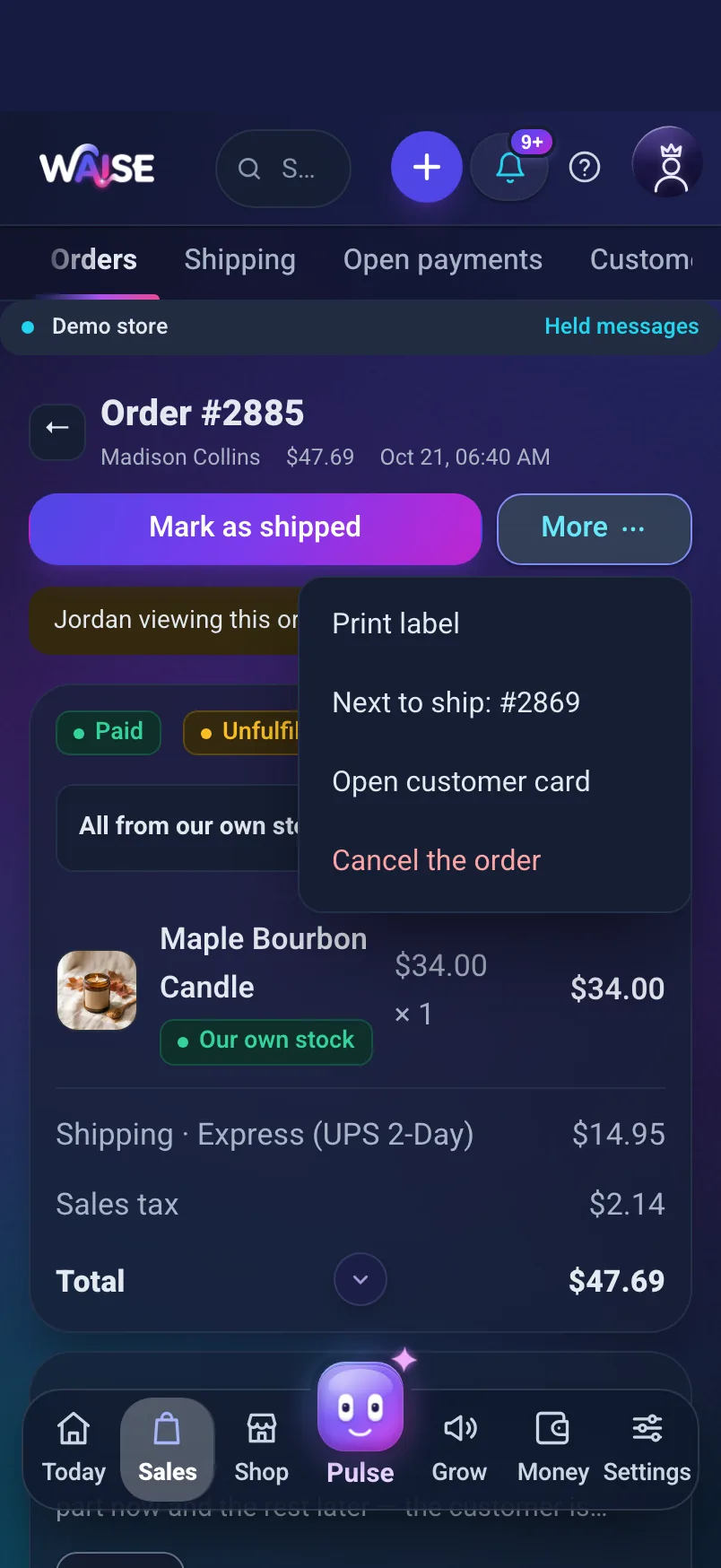
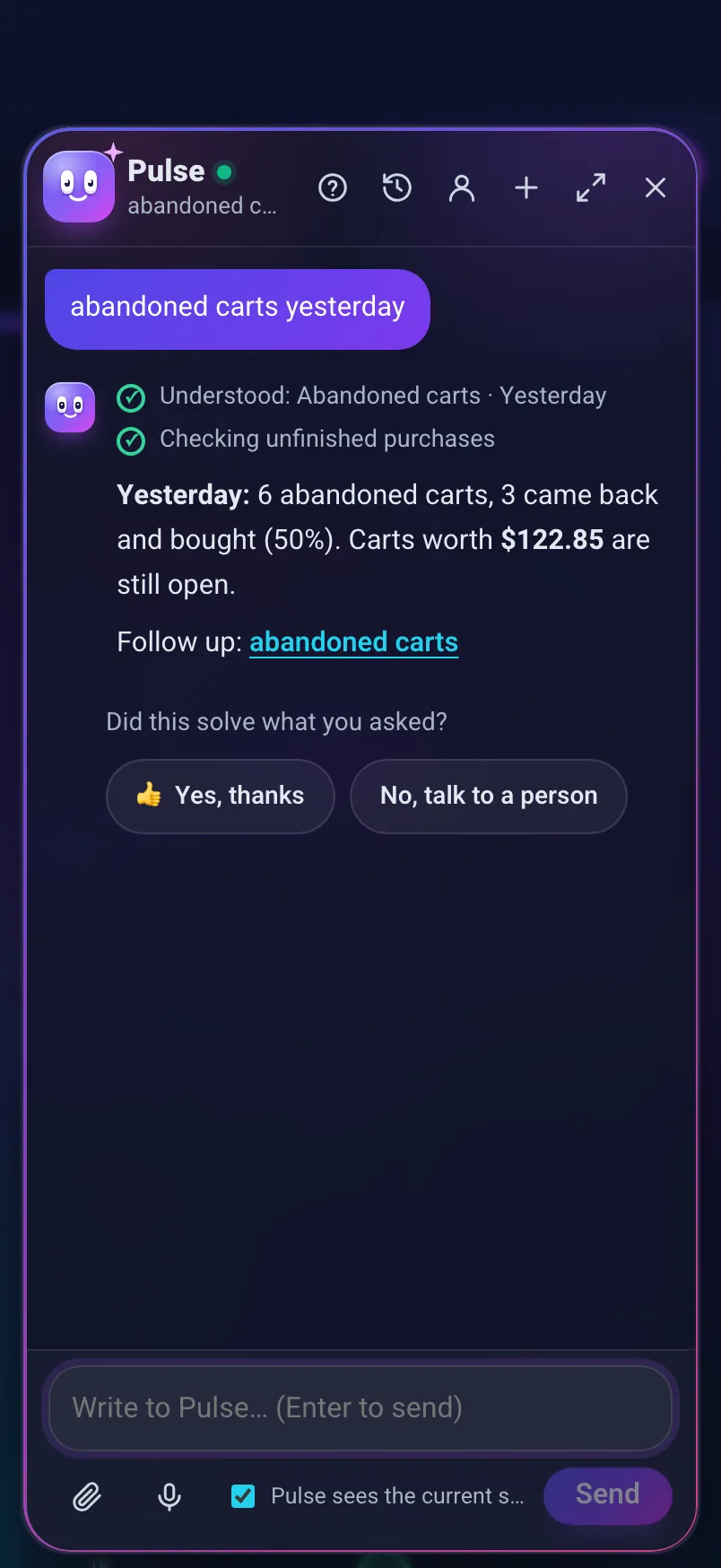
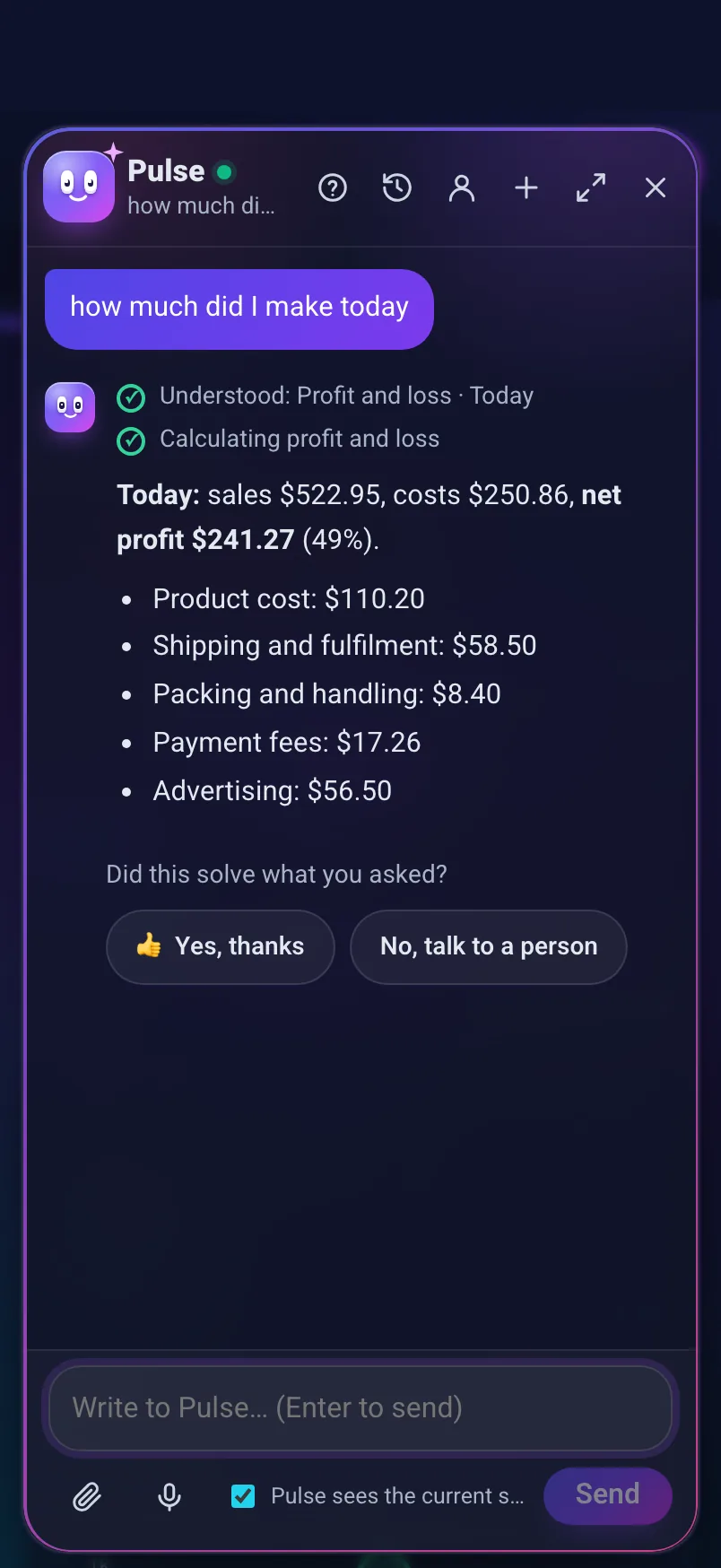
You can also build the site in another tool. Checkout and orders stay here.
Screens from the admin of Maple Candle Co, a demo store.
Your store is ready for AI shopping agents. ChatGPT, Claude and Gemini shoppers can find and buy your products, and you see every AI sale in your reports.
Everything Shopify charges $91 for (Basic plus the apps a typical store adds): $29 here. Every month you see how much stayed with you because of it.
Cost against cost, a typical month
Shopify subscription, fees and apps$0
Waise Basic$0
Stays with you$0
You keep $0 a month. $0 a year.
On Shopify, with the apps you need: $0 a month.
This is cost against cost: subscription, fees and apps, billed monthly. Sales Waise brings back are never added to the saving; your admin measures them each month. An app your plan doesn’t include is counted on Waise’s side too.
Shopify
Subscription Basic$0
Apps Judge.me, Kaching Bundles$0
Shopify’s fee 2%$0
Total$0
Waise
Subscription Basic$0
Fees on orders 0 orders$0
Apps only what the plan lacks$0
Total$0
On each system, the plan that comes out cheapest for this amount, billed monthly, with an average order of $40. Shopify with an outside processor like Stripe or PayPal, where its extra fee applies; tick Shopify Payments to see it waived in the US. At US dollar prices. Apps at their entry price for the order count. Sales tax not included on either side. Processor fees are paid on every system. Official price lists, checked on Oct 4, 2026. The others, one line each
Cards, Apple Pay and Google Pay through your own Stripe account. Bank transfer works too, set up in Settings.
14 free days, no credit card to start; a card only when you publish. Then $1 a month for your first 3 months, on every plan, and the full price from month 4. You pick your plan at the end of the wizard.
$29 a month
0% fees, no per-order fee
For a first store
$59 a month
0% fees, no per-order fee
400 Pulse conversations and 15,000 emails a month, no “Built with Waise” badge
$129 a month
0% fees, no per-order fee
1,500 Pulse conversations, 2,000 shopper chats and chat support
Waise pays for itself.
If our automations don’t bring back more than you paid this month, next month is on us.
Measured on recovered carts, win-backs within 7 days of our message and cart upsell. Not in your first paid month, for a published store with a payment gateway connected. On Company: when your automations stay on and you have at least 300 orders in the month. Full conditions
All four plans side by side · The same store on Shopify and on Waise · Everything included
14 free days with up to 5 real orders · No credit card to start · Cancel anytime. You pick a plan only at the end of the wizard.
No time to build? We’ll build the store for you, from $249.
Prices in USD. Taxes not included.
Not to start, and not to build. Sign up with an email and a password, and build your store on a 14-day free trial with no card. A card is needed only when you publish the store, and saving it charges nothing at that moment. Then your first 3 paid months cost $1 each, on every plan, the plan’s full price starts in month 4, and you get a reminder two days before billing starts. Until you publish, buyers leave their details and you get back to them.
No, on no plan, and there is no fee per order either. 0% fees, no per-order fees, no apps. Other systems take a percentage of every sale, so the better your store does, the more they make from it. Here the monthly price is flat, and it doesn’t move with your sales or the size of the cart. The plans differ by monthly quotas, not by order count: Pulse conversations (100 to 5,000), shopper chats (100 to 10,000), emails (3,000 to 150,000) and team seats. A sale is never blocked. The processing fee is separate: it belongs to the processor you chose, and you settle it with them directly.
A sale is never blocked, and every feature is on every plan: the plans differ only by how much of each you use. At 80% you get a heads-up in the bell and by email. For things that are counted, like automations, bundles, discount codes and fulfillment partners, what already runs keeps running and the next one is saved as a draft until you upgrade or turn another off. For Pulse, shopper chat, email and AI content you can add an add-on (a Pulse pack $10, 10,000 emails $12, 50 AI creations $5, a shopper chat $0.10) or upgrade. An add-on is charged on its own only if you set a monthly add-on limit, and the default is 0. And Pulse doesn’t disappear: until the month renews it keeps answering in economy mode.
If your first 3 months on Waise cost more than your last 3 Shopify invoices (plan + apps), we refund the difference. You send us the invoices, and we make the refund by hand.
Every month, on the “Today” screen in your admin and in the monthly email, you see how much money Waise brought you: carts brought back, customers who returned within 7 days of our message, and cart offers they took, from paid orders, net of refunds and tax, each order counted once. Beside it: the margin the margin guard kept, as an estimate from what sold after it blocked a price that was too low, and the apps you didn’t have to buy, at their list price. And against all of it, what Waise cost you. If in a given month the automations brought back less than you paid, next month is on us.
You choose how to start in the wizard, and you can combine several methods in settings. Connect your own Stripe account, and buyers pay by card, Apple Pay or Google Pay on your site. Don’t have one? Open one from the link in the wizard. Alongside cards you can add PayPal, straight to your business account. Want to start without a card processor? Bank transfer or a PayPal link, straight to you: the order waits, stock reserved, until you confirm the money arrived. And in preview mode there’s no payment on the site at all: the buyer leaves their details, and you get back to them. Whichever you choose, the money never passes through Waise.
A few minutes. Pulse sets it up with you: you answer a few questions and add photos, and it fills in the wizard’s steps. To publish you need just three things: a name and a category, products with a photo, and the business details the law requires. Design, shipping, payments and marketing can wait until after you publish.
Three ways, in the wizard: from photos (one per product, and the name and description are written from it), from a store you have (paste its address), or from a supplier (paste a link to their product page). Rather talk it through? Pulse sets it up with you. No time at all? We’ll build the store for you.
Paste your store’s address into the wizard, and up to 2,000 products come over: names, descriptions, variants, prices, categories and up to 15 photos per product. Customers and orders come from Shopify’s export file. A product in a foreign currency or without a photo arrives as a draft, so you can look it over. How long it takes depends on how many products and photos you have. WooCommerce works the same way, and Wix moves over from a file.
Cancel anytime from the subscription screen, no commitment. And before you go, download all your products, customers and orders in files any other system can read. You leave with everything.
Yes. From Pulse, ask to talk to a person, and the conversation goes to someone on the Waise team along with your store’s current state, so you don’t have to explain it all from scratch. The answer comes back in the same window and by email. From the Growth plan up, support is priority, and the first reply from a person comes within 48 hours on the lowest plan, down to 2 on Company. Company also has a shared WhatsApp line for its stores, in business hours.
Three ways. One flat price, with 0% fees and no per-order fees: you pay the plan and your card processor, and nothing extra on any sale. What you add to Shopify with apps, like reviews, upsell and bundles, abandoned carts, a customer club and email, is already included. A typical Shopify store adds about $52 a month in apps on top of its plan. And you can run the store by chat, with a preview and undo. Shopify has strengths of its own: a huge app store and a built-in assistant.
Yes, it’s a ready-made route in the wizard. Paste links to the supplier’s product pages, up to 10 at a time, and set how much margin to add on top of their price. Each product comes in with a name and description written for your store and up to 6 enhanced photos, and the supplier’s price is saved as your cost, so you see the profit on every sale. What doesn’t come in: the supplier’s stock and shipping times, or updates when they change a price. You place the order with the supplier yourself.
Because your money should reach you with no stop in the middle. You choose the processor, negotiate the rate with them, and can switch to another one without switching systems. Systems that process payments themselves take a percentage of every sale, and some add an extra percentage on the same sale when you use a processor of your own. We take no percentage at all, and there is no fee per order: you pay one flat plan, and the processing fee goes straight to your processor. Waise works with you, not against you, so the plans differ by monthly quotas of Pulse, shopper chats and email, not by how much you sell. Buy now, pay later (Klarna, Afterpay, Affirm) runs through your own Stripe too: you turn the methods on in your Stripe dashboard, and they show at checkout.
The assistant inside your admin. It knows what’s waiting for you today, answers questions from your store’s data, and takes actions for you, like marking an order as shipped or preparing a product draft. Without a connection it understands set commands. Connected to Claude, Gemini or ChatGPT, it understands any request in your own words, writes content and builds sections. Any change that touches money or what customers see waits for your approval, and is logged with the option to undo.
Add Waise as a connector: in Claude over a secure connection, in ChatGPT in developer mode, and in Gemini through Gemini CLI. The connection starts read-only; you turn on writing with a switch. A change to prices, discounts or anything customers see is previewed first, and happens only after you approve. Every change is logged, and most actions can be undone. Your data goes to the assistant you chose only when you ask it something.
Yes. In the wizard, choose “Site in an outside tool” and pick the tool: chat-based site builders (Lovable, Bolt, v0, Replit), coding assistants (Claude Code, Cursor, Windsurf, Codex) or other site builders (Webflow, Framer, WordPress). Each tool gets a starter kit for your store: in Lovable, one button that opens it with everything it needs; in Webflow, Framer and WordPress, one line of code you paste once. Products, prices and stock come from Waise in real time, and the site only reads what the store already shows: it has no access to customers, orders or costs, and it can’t change anything. Buyers pay on the store’s secure checkout page, and orders, shipping and emails keep working as usual. Included on every plan. The tool itself is a separate service, and with some tools, connecting your own domain takes a paid plan with them.
An email, a password and two questions about your business, and you’re in the wizard.
14 free days with up to 5 real orders · No credit card to start · Cancel anytime
Waise is founder-led, built by Or Avrahami. Partnerships, agencies, press, investors and any business enquiry: info@waise.app
Already have a store on Waise? help@waise.app · All the ways to reach us


 Amber Soy Candle
 Maple Bourbon Candle
 Cedar & Sage Candle


